This is Time Keeper WordPress plugin to turn your post/page in to quiz, exam sheet or time based survey form. You can include Time Keeper using shortcode, please find details from below –
Convert your form into Quiz/Exam/practice sheet
- time : you can set Counter time using time parameter, either you can set time in seconds or in {mm::ss} or {hh:mm:ss} format.
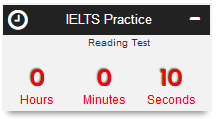
Example:time="00:10:45"
[ mytimekeepertime="03:45" when="0"until="0"warning="00:45" autoplay="0" autoplay_wait="1000" navbar="1" controlbar="1" start="1" stop="1" pause="1" start_bell="1" warning_bell="1" stop_bell="1" redirect="https://www.kernelbd.com/blog/" monitor="New Title" description="This is description" hook=".search-submit" linked="#click-a-link" attempt="0" cookie_hour="24" ]
Future Date Event Countdown / Comming Soon
- when : This option is great when you want to create a Event Counter. You can set future date to enable Time Counter in the page/post. Acceptable Date formates are – {yy:mm:dd H:i:s}, {yy:mm:dd H:i}, {yy:mm:dd}Example:
when="2017-11-25 15:45:30"
Default value:{null/empty}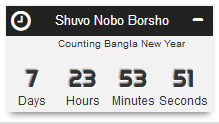
- until : This option is great when you want to create a Event Counter. You can set event/occasion date to enable Time Counter in the page/post. Acceptable Date formates are – {yy:mm:dd H:i:s}, {yy:mm:dd H:i}, {yy:mm:dd}Example:
until="2017-12-31 23:59:59"
Default value:{null/empty}
[ mytimekeeperwhen="2017-03-25 15:45:30"until="2017-04-14 12:00:00" time="0"warning="10" autoplay="1" autoplay_wait="1000" navbar="1" controlbar="1" start="1" stop="1" pause="1" start_bell="1" warning_bell="1" stop_bell="1" redirect="https://www.kernelbd.com/blog/" monitor="New Title" description="This is description" hook=".search-submit" linked="#click-a-link" attempt="0" cookie_hour="24" ]
Common Parameters
- warning : you can set Warning time using warning parameter. It will change the counter color to red and will make clock-tick sound. You can turn off the alert sound by warning_bell parameter. Either you can set warning in seconds or in {mm::ss} or {hh:mm:ss} format.
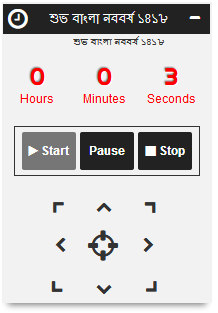
Example:
warning="00:3:45"
Default value (seconds):30 - autoplay : If you set
autoplay="1", then it will start counting automatically after page load.
Example:autoplay="1"
Default value :0 - autoplay_wait : If
autoload="1", then you can set delay time to start counting after page load.Example:autoplay_wait="1"Default value (mili-seconds):1000 - controlbar : Play/Pause/Stop buttons are placed into controlbar. If you set
controlbar="0"then buttons will not be shown, this option is great while you will autoplay the counter.
Example:
controlbar="0"Default value:1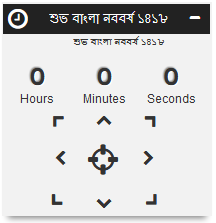
- start : If
controlbar="1", then you can turn off/on Start button by this parameter.
Example:
start="0"Default value:1 - stop : If
controlbar="1", then you can turn off/on Stop button by this parameter.
Example:
stop="1"Default value:1 - pause : If
controlbar="1", then you can turn off/on Start button by this parameter.

Example:pause="1"Default value:1 - start_bell : You can on/off sound on timer start.Example:
start_bell="0"Default value:1 - warning_bell : You can on/off sound on warning period, in every second, it will sound clock-tick until counter is stopped.
Example:warning_bell="0"
Default value:1 - stop_bell : You can on/off stop sound, when counter reaches to the end secondm, it will play a sound.
Example:stop_bell="0"
Default value:1 - navbar : Counter div can float around the window, you can move the counter div to Top-Right, Top-Center, Top-Left, Center-Right, Center, Center-Left, Bottom-Right, Bottom-Center, Bottom-Left
Example:navbar="1"
Default value:1 - redirect : At the end of counting, you can redirect the users to a specific URL.
Example:redirect="https://www.kernelbd.com/blog/"
Default value:{null/empty} - monitor : You can set Title for the counter div.
Example:monitor="Cyber Monday"
Default value:{null/empty} - description : You can set small description of your timers/event time counter.
Example:description="1"
Default value:{null/empty} - hook : Hook your “My Time Keeper” with a specific form in the current page, you can hook with any form by class-name or form id. It will submit the form after “My Time Keeper” times-up event and show confirmation message in a modal window.
Example:hook=".search-form"
Default value:{null/empty} - linked : “My Time Keeper” can click on any link/form/object after times-up, but no modal form will be shown or any confirmation message will be dispalyed.
Example:linked=""
Default value:{null/empty} - attempt : You can restrict usage of “My Time Keeper” to a specific post to a user. Within a certain period, a user can access post counter for a given number. After exceed of usage number, “My Time Keeper” will disappear.
Example:attempt="5"
Default value:0 - cookie_hour : You can set time duration for “attempt” parameter checking. In the given duration (in hour), user can access / practice “My Time Keeper” enabled form “attempt” times.
Example:cookie_hour="1"
Default value:24hours